

AI Chatbot Readiness Checklist: 12 Tests Before You Go Live
Before buying a customer-facing chatbot, test its answers, handovers, data controls and helpdesk fit. This checklist gives UK SMEs a practical go-or-delay decision.
Read ArticleFrom overflowing inboxes to repetitive document and reporting tasks, we build reliable workflows that give your team time back—without taking people out of the decisions that matter.
SIMARA AI is a London consultancy for growing SMEs. We start with one stubborn process, work alongside the people who know it best, and build something they will actually use.
Quoting, inbox triage, document handling, reporting: if your team repeats the same steps every day, that is where we look first.
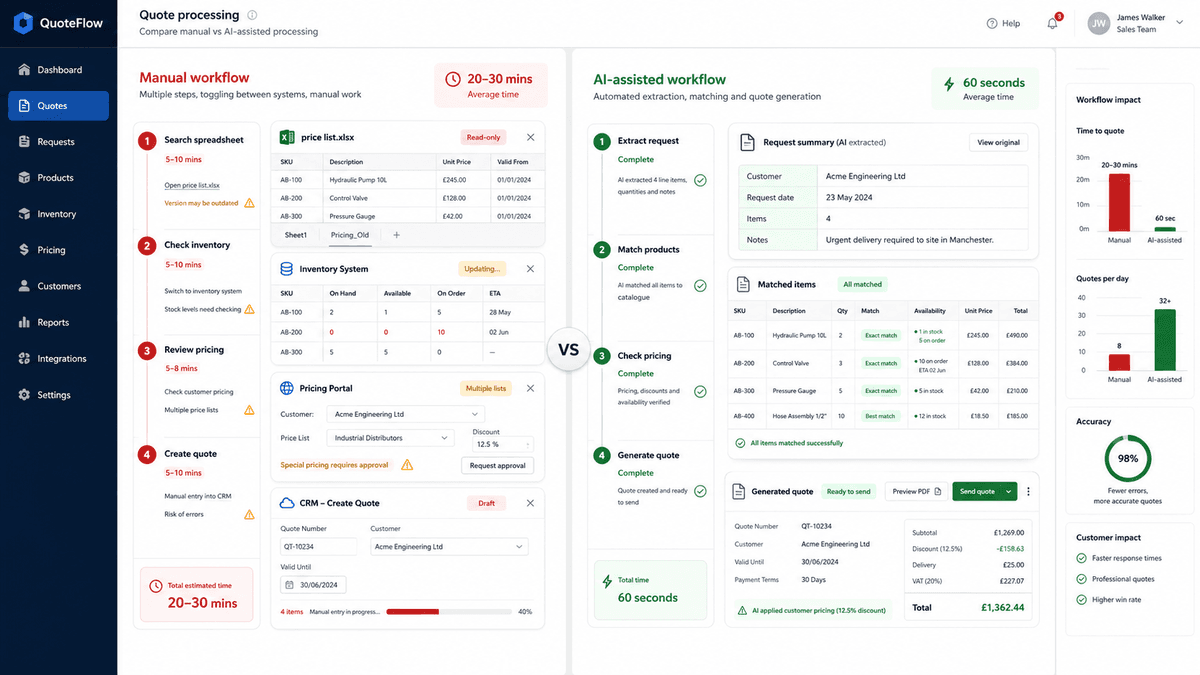
Teams search spreadsheets, check stock, review pricing, and create quotes manually.
Finance teams check invoices against PO, GRN, and ERP records manually.
Teams manually read, sort, prioritise, and route customer or supplier emails.
Staff open, rename, sort, and file documents manually.
Sales or technical teams compare customer specifications against catalogues and product data.
Managers spend time pulling data from different systems and building reports manually.
Staff time saved
Reduction within 90 days
Annual saving
All three figures come from one invoice-matching implementation; they are not averages across every client.
A few examples of the manual work we removed, how the new workflow runs, and what changed for the team.
A UK manufacturing distributor with 200+ SKUs and 3 sales staff preparing quotes manually from spreadsheets and email requests.
Sales staff searched spreadsheets for product data, checked stock across systems, and re-keyed pricing into quote templates. Each quote took 20–30 minutes and errors were common.
AI extracts request details from email, matches products against the catalogue, checks live stock and pricing, and generates a draft quote for human review in under 60 seconds.
A structured quote ready for review
Pricing rules remain visible to the sales team
A UK SME processing 500+ supplier invoices per month across ERP, email, and paper documents with a 4-person finance team.
Finance staff manually matched each invoice against the purchase order and goods received note. Discrepancies caused payment errors, supplier disputes, and delayed month-end close.
AI extracts invoice line items, matches against PO and GRN records, cross-references the ERP, and flags exceptions. Clean invoices auto-post with a full audit trail.
75% of staff time saved
65% less manual processing in 90 days; approximately £80,000 annual saving
A professional services firm receiving 100+ emails per day into a shared inbox, with inconsistent response times and missed urgent requests.
Staff manually read, categorised, and forwarded emails. Important requests were buried, response times varied by who checked the inbox, and nothing was tracked.
AI categorises emails by type and urgency, drafts replies for common requests, routes work to the right person, and logs everything for tracking.
Messages classified and routed for review
Customer replies stay grounded in approved information
A logistics company handling 50+ document types daily — delivery notes, packing lists, compliance certificates — filed manually across SharePoint and email.
Staff opened, read, named, and filed each document manually. Misfiled documents caused downstream delays, and searching for the right file wasted hours every week.
AI classifies documents by type, extracts key fields (dates, references, amounts), applies consistent naming, and files them in the correct location automatically.
1–2 hours reduced to 1–2 min
Low-confidence files routed for human review
These are the moments clients usually bring to us: the task is repetitive, the exceptions matter, and the team has found every workaround except a lasting fix.
Information moves from email to spreadsheet to system, with someone checking every step by hand.
Move the repeatable steps into one reliable workflow
A missed field or duplicate entry travels downstream, where it takes far longer to find and fix.
Validate information before it reaches the next system
Approvals and exceptions sit in inboxes while customers, suppliers, and colleagues wait for an answer.
Route the decision to the right person earlier
The answer exists, but it is split across spreadsheets, messages, reports, and systems that do not talk.
Bring the right information together around a decision
More customers create more chasing, updating, and reporting before they create more capacity.
Let volume grow without growing the backlog
The process works because an experienced person remembers what to check, chase, and record.
Build the checks and record-keeping into the workflow
Most projects begin with one workflow. We connect it to the systems you already use, test it with the people who do the work, and expand only when it earns their trust.
Practical AI strategy, opportunity assessment and implementation planning for UK SMEs.
See how it worksCustom workflow automation that removes repetitive handoffs, checks and data entry.
See how it worksDocument extraction, validation and matching systems with human review where it matters.
See how it worksHands-on AI training, governance and adoption support for SME teams and leaders.
See how it worksMake an informed decision
Use six free tools to estimate time, cost, readiness and implementation priority.
ExploreSee when no-code, a freelancer, a consultant, an internal hire or custom automation fits.
ExploreSee planning ranges, cost drivers and what is included before you send an enquiry.
ExploreWhat happened when one logistics team stopped matching every invoice by hand.
Hundreds of invoices arrived each week, and four people were needed to check them against purchase records. We built a workflow that handles the routine matches and sends only the exceptions to the team.
75% staff time saved
Manual processing reduced by 65% within 90 days
Approximately £80,000 annual saving
The staffing, time and saving figures above all belong to this invoice-matching implementation.
Each industry page covers the 5 workflows we automate most often, the systems involved, and the results our clients have seen.

Keep stock counts, supplier paperwork, and price changes in step.
See top 5 use cases
Tender intake, site reports, sub-contractor admin — without the paperwork tax.
See top 5 use cases
Spend less expert time chasing onboarding, contracts, notes, and proposals.
See top 5 use cases
Connect shop-floor signals with the paperwork and decisions around them.
See top 5 use cases
Give support, sales, and engineering teams faster access to the context they need.
See top 5 use cases
Shipment tracking, supplier comms, and warehouse ops — without the manual overhead.
See top 5 use casesHow We Work
We map what really happens, build a small version, and let your team try it on real work before anyone commits to a larger rollout.
We map the manual process end-to-end: systems involved, current time cost, error points, and business impact.
We select the workflow with the strongest mix of pain, feasibility, and measurable ROI — so you start where it matters most.
We build a small AI-assisted workflow using your sample data, screenshots, exports, or existing documents. No dummy demos.
We add review points, exception handling, confidence thresholds, and fallback rules — so nothing runs unsupervised until you trust it.
We test the workflow with real users and measure time saved, errors reduced, and adoption issues before scaling anything.
We scale the workflow and integrate it properly — or stop if the numbers do not justify further spend. No lock-in.
A structured approach focused on real business outcomes.
Automation with the right controls, transparency, and accountability.
Measure, learn, and improve — so your operations keep getting better.
Start Small, Prove Value
You do not need a large AI transformation project. Start with one manual workflow, prove the value, then decide whether to scale.
A focused assessment to uncover workflow friction, automation opportunities, and quick wins.
A structured plan for designing the right workflow automation solution before build begins.
A fast, practical sprint to test one high-value workflow with a working prototype.
Use our calculator to estimate the time and cost savings your business could achieve with smart automation.
Update the inputs below to see your estimated savings.
What type of workflow are you looking to automate?
How many people are involved in this workflow?
How many times is this workflow completed weekly?
Average time to complete this workflow manually.
Average fully loaded hourly cost (GBP).
Choose a conservative, expected or stretch scenario for this estimate.
Savings are calculated using the formula:
(Tasks per week x Minutes per task x People) / 60 x 4.33 = Monthly hours
Cost saving = Monthly hours saved x Hourly cost x Efficiency factor
Based on your inputs
Your results will appear here
Adjust the inputs and click Calculate Savings.
Who's Behind Simara
Founder & AI Automation Consultant
With 20+ years progressing from senior developer to Chief Operating Officer, Lana brings deep expertise in IT systems, ERP implementation, and operational strategy. An MBA in Finance, an IT degree, and postgraduate qualifications in AI & Machine Learning from Caltech give her both the technical depth and the business lens to design automation that actually works.
She founded SIMARA AI to give SMEs the same operational advantages that large enterprises build with six-figure budgets — starting with one workflow, proving the value, and scaling only what the numbers justify.
“Most SME AI projects fail because they start with the tool instead of the workflow. We start with the manual bottleneck, measure the cost, and build only what can prove value.”
— Lana Korzhuk, Founder
AI only works when the workflow, data, and people around it are understood. We start with how work actually happens.
We design around existing systems where possible — ERP, CRM, spreadsheets — not expensive rebuilds.
AI workflows should flag uncertainty, route exceptions, and keep people in control of decisions that matter.
We start with one workflow and prove whether the numbers justify scaling. No commitment beyond what's proven.
Before You Invest
Most SME AI initiatives stall not because the technology is wrong, but because the approach is. Here are the five patterns we see repeatedly — and how we avoid them.
Teams buy AI software before mapping the manual process it should replace. The tool doesn't fit, adoption stalls, and budget is wasted.
We map the workflow first — documenting every step, handoff, and exception before choosing any technology.
Critical information lives in spreadsheets, email threads, and disconnected systems. AI can't deliver value when it can't access clean, connected data.
We audit data sources upfront — identifying gaps and building connectors so the AI has what it needs from day one.
Fully autonomous AI sounds appealing but fails in practice. Without human checkpoints, errors compound silently until they become expensive.
We design human-in-the-loop checkpoints — AI flags uncertainty and routes exceptions to people, keeping decisions under control.
Projects launch without a clear success measure. Six months later, no one can say whether the investment paid off or should be expanded.
We define the ROI metric before building — time saved, error rate, or cost per unit — so you know exactly when it's working.
Ambitious rollouts across multiple workflows create complexity, resistance, and fragile systems that break under real conditions.
We start with one workflow — prove it works, measure the value, then scale only what the numbers justify.
Named client result
A lead-research and qualification workflow gave the sales team more consistent prospect context and improved conversion by 37%.
Client name published with permission; figures are tied to this specific conversion workflow.
Notes, lessons, and straight answers from our work with AI and business operations.
Before buying a customer-facing chatbot, test its answers, handovers, data controls and helpdesk fit. This checklist gives UK SMEs a practical go-or-delay decision.
Read Article
Decide whether external Power Automate expertise earns its fee by comparing delivery dates, incremental value, acceptance evidence and internal ownership.
Read Article
A concise five‑test worksheet to compare content automation tools on approvals, version behaviour, scheduling and safe manual publishing using one synthetic asset.
Read ArticleSend us the manual process costing you the most time. We'll reply with an honest view of what automation could look like.
No obligation. We will tell you honestly whether automation is worth it for your situation.